Call Us Toll Free - US & Canada : +1-(888) 602-0119

Top 10 WooCommerce Coupon Plugins to boost sales in 2022

Nowadays, people are always on the lookout for exclusive deals, vouchers, and discounts. So, you can say that coupons are the driving force to earn exclusive deals and customer loyalty. As per the sources, 90% of shoppers utilized coupons in 2020.

Note:- You are missing great opportunities if you fail to include them on your e-Commerce website.

Key takeaways:

  • Coupons are the best way to drive clients and expand the customer base.
  • Coupons can assist you to introduce new products
  • Encourage new customers.
  • It attracts existing clients to purchase from your store.

WooCommerce is an incredible eCommerce solution. It can be utilized for any online platform. Business owners initiate this solution because of its open-source nature.

The eCommerce plugins work flawlessly with WordPress. It has raised its fame because of its adaptability and adjustability. The statistics of WooCommerce make it a superior comprehension in the digital world.

According to SoftwareFindr, six percent of online sites and twenty-six percent of online use WooCommerce to develop a strong eCommerce business.

Using WooCommerce and WordPress coupon plugins is the game changer if you are running an online business. It is a powerful yet simple way to boost engagement and solidify loyal clients.

What must you contemplate for WooCommerce coupon plugins?

There is a huge range of WooCommerce and WordPress coupon plugins. You can use a handful of factors like discounts types, budget, and WooCommerce-specific features. Perhaps you must look for a straightforward and basic solution for displaying and developing coupons on your website.

Tips to provide coupons to attain maximum potential clients for your WooCommerce website

Now, you have learned about the solid foundation regarding WordPress coupons plugins. Let us check some prominent ways that guarantee a great discount option that works with the customers:-

  • Easy to find products:

Have an awesome coupon for the product? Do your clients face difficulty tracking down your product? If yes, then you are nothing but a failure. You need to develop an easy deal so that your clients can directly get to you and finalize their purchases

  • Import coupons for your clients

It is not good if your visitors hunt on your website for codes. You need to place the coupons, discounts, or sales at the center of the website. This will capture the interest of the client.

  • Keep relevancy

You must present the coupons that are relevant to the products that your clients have purchased. This is applicable for those products that are available in the shopping carts currently.

  • Customization of the coupons

The coupons that you provide your user are the development of your brand. If you use strong copy, it can make your potential users endure like they are getting rare deals.

  • Do not overdo it

If you overload your website with vouchers and deals, it will make things less exclusive. Try to experiment with attractive and varied messages & coupons. It will make things fresh.

  • Make a deal

Nowadays, many visitors do not have any trouble sharing their email addresses. It is not simple to provide your clients with special discounts to secure sales. You need to have a proper strategy and finesse to retain, engage, and acquire potential clients.

Top 10 WooCommerce Coupon Plugins

1. WooCommerce Discount Rules by Flycart

flycart

This WooCommerce Coupon Plugin goes past the basic coupon-based discounts. It provides you with huge loads of features.

It assists you to build dynamic discounts and pricing in the WooCommerce store.

Now, these conditions are based on the following:-

  • Roles of the users
  • Categories
  • Quantity
  • The email id of the customers
  • History of the purchases
  • Shipping address
  • User roles
  • Products
  • Variants
  • Attributes
  • Order total

So you can build for mass tiered pricing deals, cart discounts, or total-based discounts.

You can set discount rules to automatically apply or after utilizing a coupon code. A similar coupon code can likewise be utilized to activate different discount rules.

The fundamental benefit of this coupon plugin is that it permits you to make discount rules in three basic steps.

The odds of clients forsaking your store cart will be negligible. It is in light of the fact that the plugin assists in displaying the discounts right on the cart or product page.

You can purchase this WordPress coupon plugin for $49 per year.

2. YITH WooCommerce Gift Cards

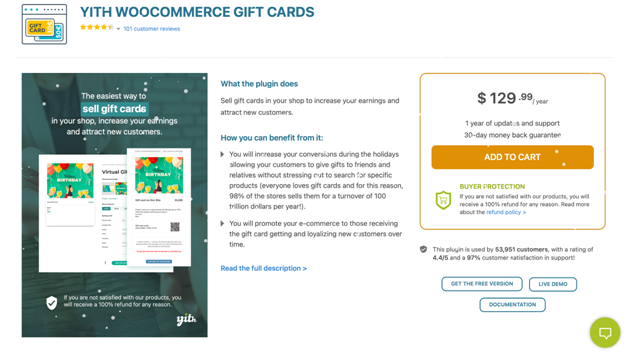
This is one of the best WooCommerce Coupon Plugins. It empowers you to provide your site visitors with the opportunity to buy gift cards to your WooCommerce store.
Yith woocommerce

Ideally, you can send these gift vouchers to new potential clients who will make purchases. They will become loyal adherents of your brands. This is a gainful methodology for lead generation.

For instance, you can make digital and physical gift vouchers. It will permit your clients to set their own gift voucher sums. There are numerous other features also that you can enjoy.

3. SUMO Coupons – WooCommerce Coupon System
Sumo Coupons

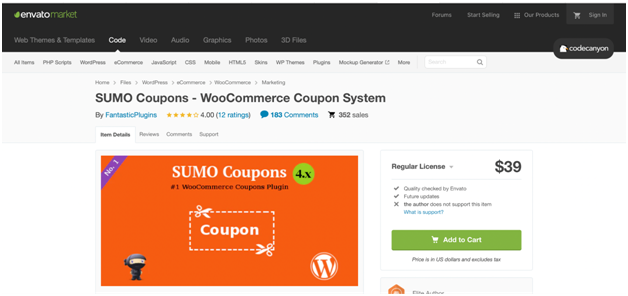
SUMO Coupons is the best WooCommerce coupon framework. This WooCommerce Coupon Plugins is best for your online store. Using SUMO Coupons, you can give your clients great coupons for Sign up, social media promotions, Product Purchases, and writing Reviews.

It contains three coupon modes, they are:-

  • Email Coupon Mode
  • Credit Coupon Mode
  • Auto Apply Coupon Mode

You can provide fixed discounts and percentage discounts through coupons using this system of WooCommerce coupons.

4. Ninja Popups

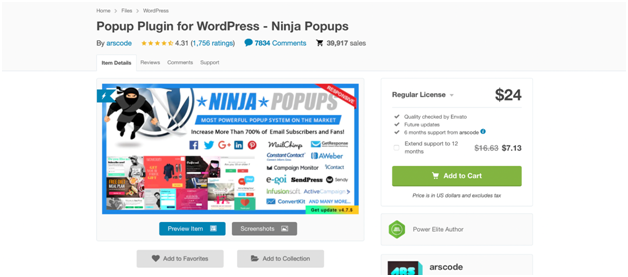
This is a one-of-a-kind WooCommerce Coupon Plugins. It allows you to add vouchers to pop-ups that it showcases to your WordPress site guests. You can make your popup utilizing the visual editor. You can take advantage of new themes for added creativity and inspiration.
Ninja Coupons

Also, there are eight opt-in panels to choose from seventy-four animation effects.

This dynamic WooCommerce coupon plugin is mobile-friendly and responsive. It can be deciphered utilizing the WPML plugin. It even coordinates with well-known email service providers.

Additionally, you can coordinate your cherished social media networks. It includes Facebook, Twitter, LinkedIn, Google+, and Pinterest

Ninja Popups isn’t an explicitly designed WordPress coupon plugin. But you will love its adaptability.

5. WooCommerce Ultimate Points and Rewards

This WooCommerce Coupon Plugin is a complete answer for compensating clients to your online store.

ultimate points

With this WordPress coupon plugin, you can relegate points to product categories and individual items. You can design the settings to permit your clients to impart points to different clients. You can deduct the points and manually add them to the accounts of the customers.

The fundamental benefit of utilizing this WooCommerce coupon plugin is that it makes it simple for you to secure new clients. It can likewise assist you to build product reviews and boosting referral marketing.

6. WP Coupons and Deals

Your search is over if you are seeking a powerful yet simple WordPress coupon plugin. You can add discounts and vouchers to your site’s pages and posts.

coupons deals

Unlike other WooCommerce coupon plugins, this one is designated explicitly for affiliate marketers.

It is intended to assist to promote deals and affiliate vouchers. WP Coupons and Deals secures your deals by guaranteeing guests to click on your affiliate links.

7. Coupon Creator

This WordPress plugin is a simple-to-utilize custom post type with a couple of settings to design. You should simply generate a shortcode. You can place your coupon on any page or post you need.

Coupons Creators

With this WordPress plugin, you can display your coupons. You can display and create WooCommerce-explicit coupons. You can exploit the speedy and mass functionality of the expiration date.

8. Social Offers
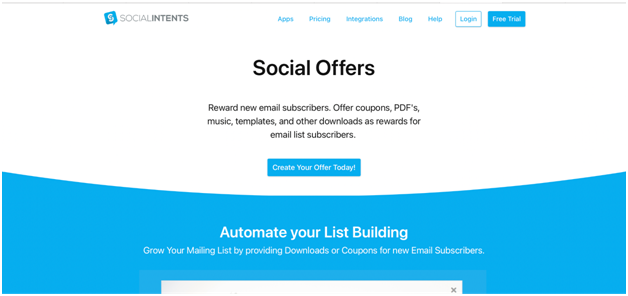
Social Offers

It is a strong WordPress coupon plugins. This plugin likewise upholds additional premium applications. For example, an email list builder for expanding supporters or a Live Chat function.

9. Code Shop for WordPress

It is a strong WordPress coupon plugin that allows you to offer the following categories.

  • Licenses
  • Coupons
  • vouchers

You can provide these directly from your websites. It interfaces flawlessly with payment gateways like PayPal, Authorize.Net, and Stripe.
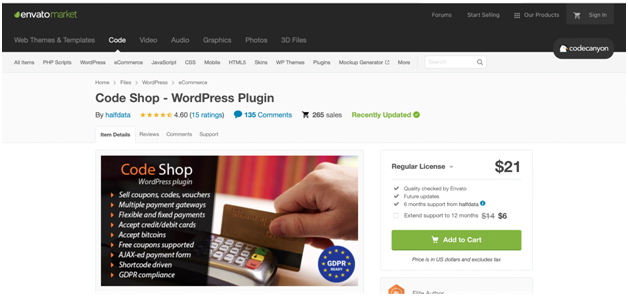
Code shop

It allows unlimited campaigns. You can convey coupons, vouchers, or permit codes by means of email. You can even convert it into numerous languages for reaching a worldwide audience. Hence, you can create more revenue.

10. Coupon Wheel For WooCommerce and WP

Coupon Wheel For WooCommerce and WP will take you back to your childhood. Do you remember spinning a fortune wheel to get your favorite toys and candies? With this WordPress coupon plugin, your clients will enjoy fortune with different limits.

The most outstanding aspect of this WooCommerce coupon plugin is the discount wheel. Hence, your clients can display the exit intent. This WordPress plugin is viable with iOS and Android devices.

You can try these and make your online business phoenix amazon your competitors.

How to integrate WooCommerce with Coupon Plugins?

First, you need to “Enable coupons

For this visit “WooCommerce” and choose “Settings”.

Click “General” and tap “Enable coupons”. To do this, you need to choose the box “Enable the use of coupon codes” in your store.

Enable Settings

Next, we need to manage the General Settings

To do this go to “WooCommerce”. Then tap the button “Settings”. Click the tab “Smart Coupons”. You will see the settings of Smart Coupons as shown in the image below:-
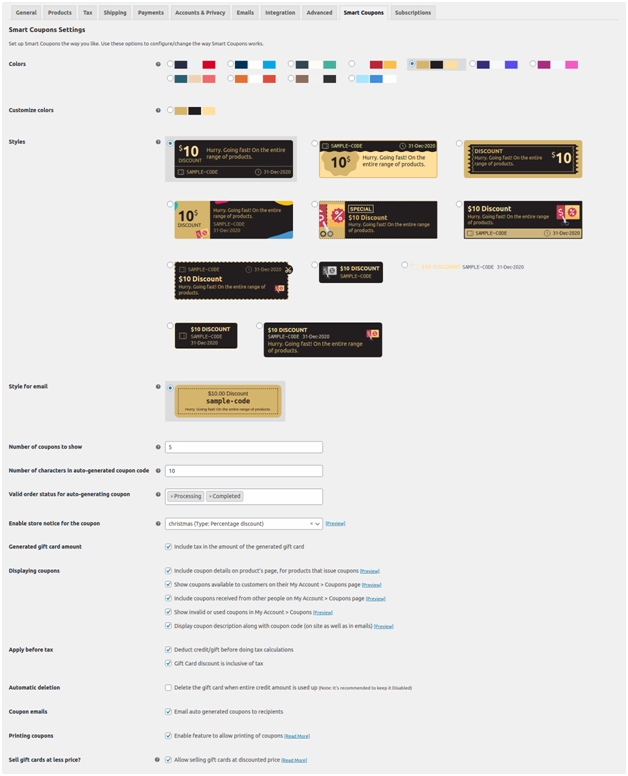
Smart coupon seattings

Shop

  • The generated amount for store credit: Enable/ check “Include tax in the amount of the generated store credit”. If it is unchecked/ disabled then the credited amount will be less than the amount paid by the client.

● Display Coupons: This is a section where you can do the settings related to displaying coupons.
● You can include the details related to the coupons on your product page.

Woo logo

You can display the coupons available to your shoppers on their accounts. For this click “My Account” and tap “Coupons page”.

Coupons

You can even list the coupons listed by other people. To do this, click “ My Account”. Next, you need to tap “Coupons page”.

Coupons Received

You can display the used or invalid coupons. Tap “My Account” and click “Coupons”.

invalid coupons

You can also display the description of coupons along with the coupon code.
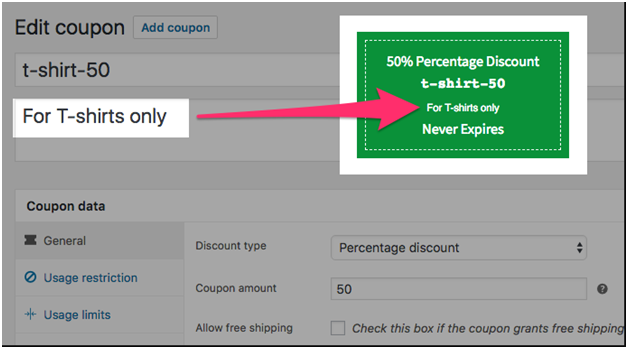
Edit coupon

In conclusion!!

It is just a common misconception that coupons are used by shoppers who look for bargains. But in a real-time scenario, it is highly appreciated by all types of customers.

Consider checking the following stats if you have doubts regarding this:-

  1. 96% of shoppers will love to use coupons if they already have one.
  2. 49% of users look to shop at discounted rates.
  3. 79% of millennials and Gen Zers check for discounted programs or loyalty from their favorite brands.

With pandemics on the rise, shoppers look for ways to purchase online. Shoppers are struggling hard with the economy. Hence, as the business owner, it is vital for you to consider the strategies. Employing coupons for your eCommerce store is one of the best strategies that you must take for your business. This will assist you to earn long-term acquisition of customers, loyalty, and satisfaction.

Planning to implement WooCommerce Coupon Plugins for your WordPress site, hire WP Customify. With us, you can get support services, configuration support, etc. We can help you streamline and design your WordPress upkeep and site maintenance. Hence you can pay special attention to boosting the conversion and driving traffic. Contact us today!!

How can I do Klaviyo WooCommerce integration?

Marketing is one of the key factors and strategies to run a successful eCommerce business. It is prudent to run email marketing campaigns because it assists you to stay closer to your clients. You can update your potential clients regarding the upcoming discounts, sales, promotions, announcements, etc.

Agree on it or not, email is one of the best marketing channels that can effectively manage the marketing funnel. This includes the post as well as the pre-purchase phase. It is an adhesive way to hold your customers and business together.

This strategy will keep your client informed about every update related to your business. It will allow you to build trust among the common buyers. Further, it will help you to improvise the sale and develop trust with the customers.

Why should you go for email marketing for your business?

For this, let us check some statistics why you should go for email marketing for our eCommerce store:-

  1. DMA Insight shares that over 99% of buyers check their inboxes every single day.
  2. eMarketer reports that 80% of business owners believe email marketing is the best tool to retain customers.
  3. 59% of users shared that email marketing has influenced their decision on the purchase.
  4. Almost 42% of buyers in America have subscribed to email marketing to receive special discounts and offers.

Now, you need to invest significant money and time to market for your eCommerce site. Klaviyo is an amazing platform for email marketing. It allows the companies to attract and interact with their clients.

Klaviyo WooCommerce integration can assist you to run your eCommerce business successfully. The best part is you can send/ forward personalized emails to your clients. All you need to do is analyze their behavioral data and purchase history.

It can even provide personalized features for automation and assist you to maintain the historical data in full sync.

A brief introduction

1. WooCommerce

Since 2011, WooCommerce has served both large-scale and small-scale businesses. It is an amazing WooCommerce plugin that can convert your website to a proper eCommerce website.

woocommerce

Source: WooCommerce

It can assist you to add the basic functionalities to your eCommerce store. This includes order management, payments, shipping, and many more. The best part is that people without any coding knowledge can also maintain their websites.

According to the sources, almost 99% of eCommerce websites in WordPress are using WooCommerce. It is because it is quite easy to set up and maintain. You can even enjoy the user-friendly interface. This platform even supports paid and free extensions.

This can assist you to transform your store using advanced features. WooCommerce also can feature data analytics and reports. It can even give you a holistic view regarding the performance of your eCommerce store.

WooCommerce’s key features

You can call it an ultimate plugin. It can convert your website quickly.

  • Reporting

Your users can analyze and see the best winning products, categories, Sales stats, and many more. This platform can make your data available and thus you can build great insights from it. You can even optimize your eCommerce store.

  • Inventory management

This platform will give updates regarding the low stock. Moreover, you can keep track of your stock level. This platform will even hide the products that are out-of-stock automatically.

  • Pre-built themes

It allows you to use the themes of WordPress and can instantly set up your store. You can manage all sorts of categories based upon your requirements and industries.

2. Klaviyo

It is a cloud-based platform for client growth and email marketing. Klaviyo can assist you to get more clients and retain them to grow your business. It can assist the store owners to give a personalized experience to their clients across numerous channels of marketing tools. This includes web, in-app notifications, SMS, and many more.

Klaviyo

You can send automated emails to your clients based on their abandonment carts, purchase history, product recommendations, etc.

Klaviyo’s key features

Klaviyo is the best way to automate your targeted email campaigns.

  • Reporting that is based on RoI

It comes with reporting and analytic tools for the eCommerce website. You can do the tracking of how your SMS/ email is performing. And thus, you will get better insights into marketing.

  • Strong segmentation

One can send their user’s personalized ads and emails. It can develop segments by employing user data to target potential clients.

  • Automation:

It comes with common flows of eCommerce and one can customize it completely. You can use the features such as the Drag-and-drop option. You can develop the clocks to map the experience of your end clients for your message.

Advantages of Klaviyo WooCommerce integration

Let us see some of the benefits of doing Klaviyo WooCommerce integration:-

  • This integration will assist you to integrate the historical data and allow your user for monitoring. The naive data will be synced with the real-time.
  • It will allow your users to forward targeted emails. This will be based upon their purchase history and behavior.
  • So, whenever the user places an order for the new product, they will receive the email. Apart from this, they will be updated with an email regarding the discounts on the other new products.

Steps for Klaviyo WooCommerce integration

Step 1: Installation of Klaviyo WooCommerce integration

1. Firstly, log in to the WordPress account.
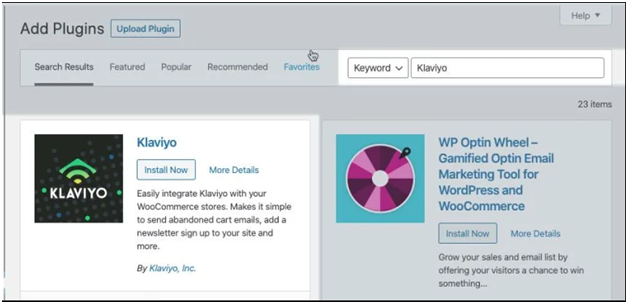
2. Click on the options “Plugins” and choose “Add New

Add Plugins

3. On the search bar, tap the word “Klaviyo”.

upload Plugin

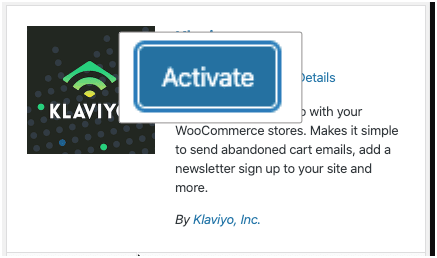
4. Tap the button “Install Now”. Next, tap the option “Activate” for Klaviyo WooCommerce integration.

activate

Step 2: Configuration of Klaviyo WooCommerce plugin

  1. Login to the Klaviyo account.
  2. Next, you need to navigate to “Account” and click “Settings”. Browse for the option “API Keys”, click it for Klaviyo WooCommerce integration.

Public api key

3. Visit back to your WordPress site and navigate for the option “Plugins”.
4. Just under the settings of Klaviyo WooCommerce Plugins, you will see an option “Settings. Go for it and open the settings of the Klaviyo WooCommerce plugin.

klaviyo settings

5. Next, you need to paste the copied public API Key. This you can copy from the field of text against “Public API key”. This is also termed as Site ID.

Public api keys

6. Look for the option in the box for “Enable Klaviyo signup forms’.
7. Next, you need to complete your list of preferred IDs in the field of text. For this, you need to enter on “Klaviyo List ID for Email”. It will assist you in the collection of email subscribers.
8. Followed, you must check for the option “Subscribe contacts to email marketing”. Here you need to change the settings as per your business prerequisites.
9. Next, tap on the button “Save Settings”.

Step 3: Enable the Klaviyo WooCommerce integration

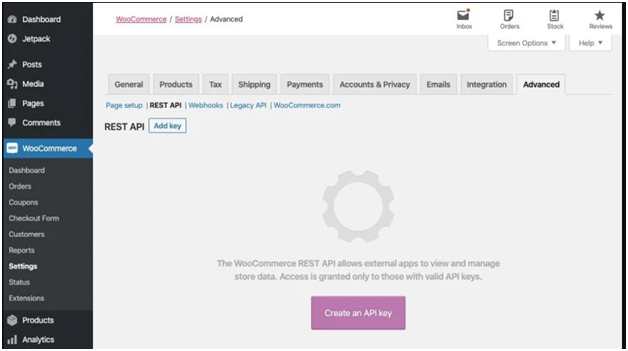
1. You need to look for “WooCommerce” in this step and click on the option “Advanced”. Click “Rest API”.

Rest Api

2. You need to develop a new API Key for Klaviyo WooCommerce integration. Next, click on the button “Add key”.

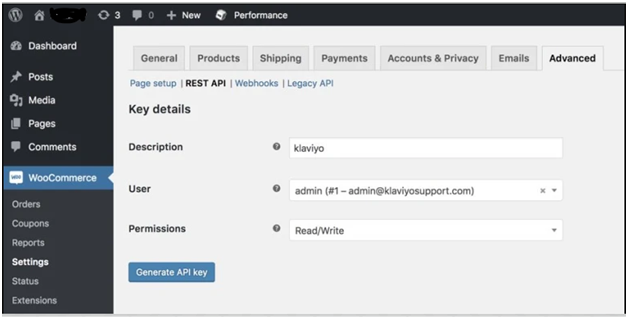
3. In this step, you need to complete the details:-

  • Under the option of Description, you need to enter the details regarding your “Klaviyo WooCommerce”.
  • For the section user, you can choose the option as any other or keep it as default.
  • You need to choose the option between “Read” or “Write” under the option “Permissions”.

Woocommerce settings

4. Tap on the section “Generate API Key”. Here you will get your Customer Secret and Consumer Key.

key details

5. You need to visit your Klaviyo account.
6. Navigate to the options “Integrations” for Klaviyo WooCommerce integration.
7. Tap on the button “Add Integration”.

Add Integration

8. It will get you to settings of “Klaviyo WooCommerce Integration”.
9. In this very step, you need to give the URL of your store. The “Store URL” is the URL that your clients will be using.
10. Next, you need to paste the generated consumer key.
11. Complete all the details as per the prerequisites. Then tap on the option “Connect to WooCommerce”.

Integration Settings

You are done with Klaviyo WooCommerce Integration!!

In a nutshell!!

Klaviyo WooCommerce integration can assist to develop a memorable experience. You can understand listening cues from your clients, subscribers, and visitors. You can turn valuable information into relevant messages.

Do you have an engaging and unique shopping experience for your clients? Hire WP Customify!! We can deliver you a functional, responsive, and impeccable eCommerce store with powerful themes, rich interfaces, etc.
Top reasons that you must consider us

  • Seamless maintenance and support
  • Reduced time for development
  • Agile approach
  • On-time delivery of project

How to do SMS integration in WooCommerce?

Have you ever noticed getting notifications on smartphones after you make your purchase? Well, these notifications add convenience related to the order status.

Sending notifications via text message is a growing trend. Nowadays, many eCommerce businesses are opting for this growing trend.

SMS integration in WooCommerce provides enhanced services to customers. This denotes that the customer will be back probably for the second purchase. With SMS notifications, business owners can get in touch with their customers. They can send coupons, notify them to stay abreast.

Do you own an eCommerce website? You must go for SMS integration in WooCommerce then. Why? Let’s read further to find out:-

Why must you go for SMS notifications to WooCommerce?

SMS notifications can connect with your users/ clients in real-time. Usually, people read/ view/ open text messages within seconds of receiving. Hence, businesses are opting for WooCommerce SMS integration.

With WooCommerce SMS integration, you can notify about special coupon codes. You can also encourage your potential users to shop again. It is one of the best creative ways to stay connected with the users.

  • You can send shipping messages and confirmation about the orders.
  • Use this medium to deliver coupon and promo codes.
  • Alert the users that their favorite items are back in the inventory/ stocks.
  • You can notify about flash sales using SMS integration in WooCommerce.

What do you understand about the SMS Gateway API?

You can define it as instructions sets. It enables an app/ website to send messages via SMS Gateway. Majorly, businesses opt for SMS integration in WooCommerce because it has got the capability to add bulk native SMS. It can be done to existing apps and software.

How to get started with SMS Gateway API with WooCommerce?

  1. SDK/ Libraries
  2. API documentation
  3. Hire the best web design and development company for SMS API integration in WooCommerce

Active Campaigns, Podium, Bulk Gate, are some of the best SMS Notifications plugins. Here, as an example, we will understand SMS integration in WooCommerce through Twilio.

A short introduction about Twilio

Twilio is an amazing service that offers SMS services, voice messaging. Twilio is popular because it is easy for SMS integration in WooCommerce.

One can start with a free trial. And can enjoy the benefit of experimenting with the services.

How to integrate SMS API in WooCommerce?

Steps #1: Set up the SMS account of Twilio for WooCommerce SMS integration

First, you need to sign up for the Twilio account for WooCommerce SMS integration.

Once you sign up, ensure to fill in the details asked. When done, you need to do the verification of your phone number as well as your email address. Next, you will be guided to the dashboard of Twilio.

Verify Email

Next, you need to choose the option ‘Alerts & Notifications’ and ‘SMS’.
Tap the option ‘With minimal code’ and then click ‘PHP’.

Welcome to twilio

Fill in all the details and choose; ‘Get Started with Twilio’.

After you sign in, you will be directed to the dashboard of Twilio. Choose the ‘Get your first Twilio number’ and get the phone number to use the account.

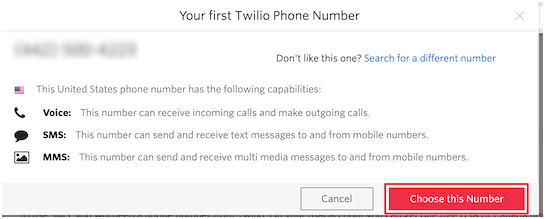
You will see a pop with the new phone number.

Twilio Phone number


Tap this option; ‘Choose this Number’. You can choose this option if you like the number.

On this screen, your new number of Twilio, Account SID, and Account SID will be listed.

Note:- Please keep this tab open, you may need it later for WooCommerce SMS integration.

Project Info

Step #2: Installation and activation of Uncanny Automator for WooCommerce SMS integration

You need to use an automation plugin to send SMS from WooCommerce. So far, Uncanny Automator is the finest WordPress automation plugin.

Uncanny Automator

It is user-friendly and comes with different automated workflows. You can manage to set up things easily.

Step#3: Generate SMS notification using Uncanny Automator for WooCommerce SMS integration

Your Uncanny Automator is activated at this step. Next, you must include SMS notifications to your WooCommerce.

Then you must connect your Uncanny Automator with a Twilio account for WooCommerce SMS integration.

Check for “Automator” and tap “Settings”. Make sure to click the option ‘Twilio’.

Next, you need to enter the Twilio Number, Account SID, and Auth Token.

Next, tap ‘Save API Details’ for WooCommerce SMS integration.

Settings

Next, you need to set up the notification. Now when a shopper places an order in WooCommerce, it will prompt an SMS automatically.

Go to Automator and click Add new. You will have to choose between ‘Everyone’ or ‘Logged-in users’.

Here we will choose ‘Everyone’. Hence, the shoppers can receive SMS notifications. It does not matter that the shopper has checked in from the guest account.
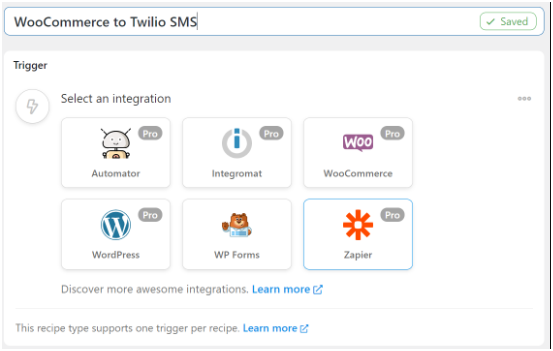
Next, you must name your recipe.

In the meta box of Trigger, choose ‘WooCommerce’.

Woocommerce to twilio sms

Next, select the trigger.

Here, we will go for the first option.

Trigger

Next, you need to choose the condition of the trigger.

From the menu of drop-down, pick ‘completes’. So, when the customer makes their purchase it will trigger the automation.

Next, tap ‘Save’.

Trigger Save

Now, you need to choose a product for SMS integration in WooCommerce.

Now, you can select all the products that are available in your inventory/ store. Choose the option ‘Any product’ and tap ‘Save’.

Any products

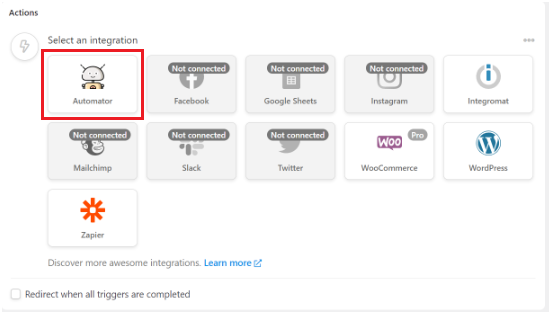
The trigger will be saved by the Automator. Then check-in for the next section and tap the button ‘Add action’.

Add Action

Choose ‘Automator’ from the integrations list.

Automator

From the dropdown options choose the option ‘Call a custom function/method’.

Action

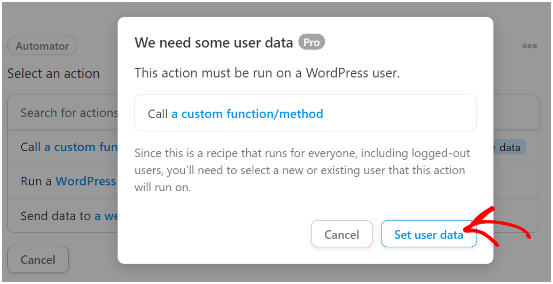
Your screen will display a pop-up that notifies the actions that you must perform. Tap the button ‘Set user data’.

Set user data

Since earlier we chose the recipe as “Everyone”, hence we need to choose between the two actions. They are the “New user” or “Existing user”.

New user

Tap ‘New user’ for WooCommerce SMS integration.

The Automator will set the user data that you want to use. Make sure to choose the corresponding field of WooCommerce.

For instance, for the field ‘First name’ we will use ‘Billing first name’ for SMS integration in WooCommerce.

Billing

Next, you will see the setting of the user role. You can set subscribers for the user role. And can opt for the option ‘Do Nothing’ for the existing users.

Tap the ‘Save’ and click the button ‘Add action’. Then go for the ‘Twilio’ for SMS integration in WooCommerce.

Select an Integration

Choose ‘Send an SMS message to a number’ from the dropdown menu.

Billing Phone

You will see a field where you have to fill the Body and “To” address.

send an sms

On to the section ‘To’ field, click the action ‘Asterisk’. Choose ‘Billing phone’. This you can find from the dropdown list.

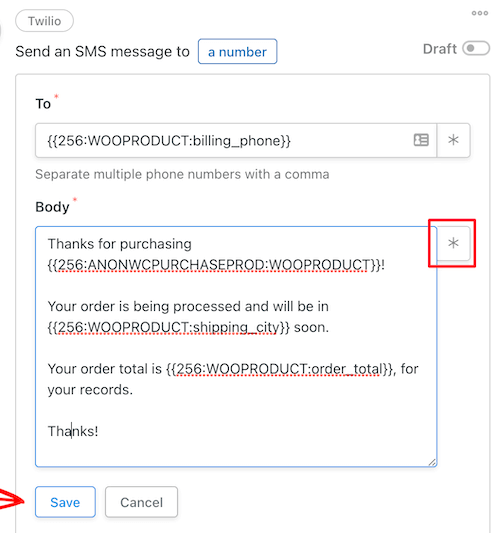
Next, customize the text messages and click ‘Asterisk’. Hence, can manage to add the data from the orders. This includes the total price, name of the product, city, etc.

Save Twilio

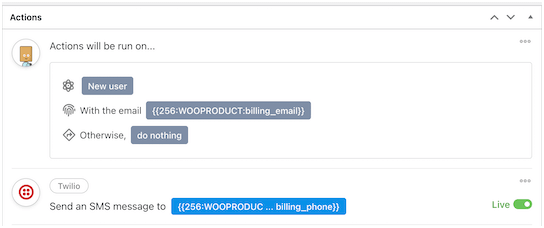
Click “Save” and check the action summary.

Action will be run

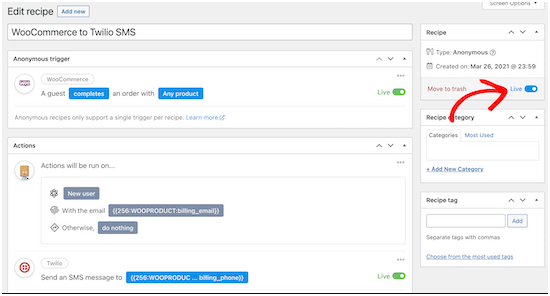
Next, you need to make the recipe active.

At the Recipe box, you need to switch the toggle from “Draft” to “Live”. This you will find in the editor section.

Edit recipe

The new recipe is active now. And you have successfully done SMS integration in WooCommerce.

Note:-You must check the workflows and ensure that the recipe is triggered. Also, make sure that the correct actions are performed.

In a conclusion!!
We hope that this blog on WooCommerce SMS integration has given you deeper insight.

WP Customify is the leading WooCommerce support service company. We provide customized solutions and services like payment gateway integration, Plugin integration, etc.